How the Shein Free Trial System Works – The Full Guide
Por: Lucas Bastos em 15 de setembro de 2026
Ads
Shein testing program: Step-by-Step App Trial Guide
Fresh items arrive every week to test at home, but available stock goes fast. Here is how to complete your profile and raise your chances of getting picked.
Ads
Notice — This informational page outlines the official app’s trial system. We are an independent guide and not affiliated with the store. Selections are handled automatically by the app. Please read all rules before entering your requests.
Why Do Many Applicants Get Skipped?
Thousands of users apply each week. A large number miss out because they skip filling in their body sizes, submit requests right before the weekly timer ends, or post poor-quality pictures after winning.
Ads
Want better odds? Fill in your size details, pick your items as soon as the new list updates, and publish detailed reviews with clear photos.
How the Free Trial System Works
The app offers this feature to collect genuine feedback from shoppers. When selected, your item is sent directly to your door with zero shipping costs, and you simply post your honest opinion on the app.
The catalog resets every 7 days with limited stock. Selection relies on account activity, fast entry, and well-written past reviews rather than random luck.
What Items Can You Try?
Products come from almost every area of the shop. You can find everything from main wardrobe pieces to handy everyday accessories.
Along with shirts, skirts, and denim, items like lipsticks, makeup brushes, hair accessories, and home organization gadgets show up regularly.
Top Product Types Available:
Find the Trial Center in Your App
Open the app on your mobile device. Tap the Profile tab, scroll down to More Services, hit Other Services, and open Free Trial Center to view available products.
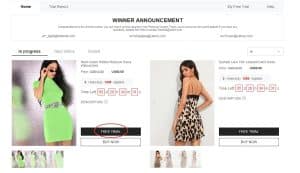
Visual path to reach the free sample center in the mobile application
Pick Up to 3 Products a Week
You can choose up to 3 items every 7 days. Select your desired item, choose your body size, and double-check your shipping details to avoid cancellation.
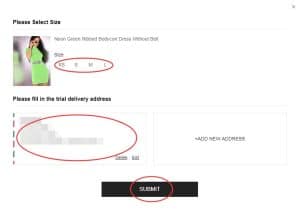
Selecting garment dimensions and confirming your delivery home address
Track Your Selection Status
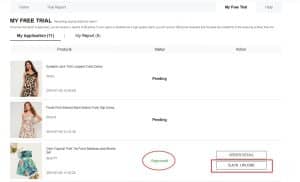
Reviewing requests takes around one week. Check the “My Free Trial” page. “Approved” means your package is on its way. “Failed” means another person was chosen this time around.
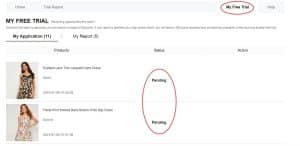
Screen where you monitor if your trial entry was accepted or declined
Post Your Report Before the Deadline
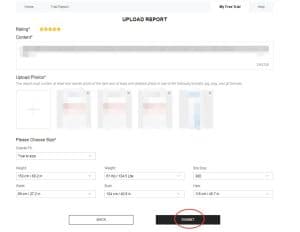
Once delivered, try the item on to inspect fabric quality and fit. Write a simple, honest review and add clear photos (1 full outfit photo and 2 detailed shots). Submit under “My Report” within 10 days.
Interface where you type your thoughts and attach photos
Collect Reward Points
Open My Report to check if your post was approved. Passing reviews give you 20 points. If your post is awarded “Quality Review” status, you receive 100 extra bonus points.
Confirmation screen showing added points after review approval
Correct Your Review If Returned
If your post status shows Rejected, no worries: you have 1 chance to fix it. Tap Rewrite, add better details to your text, upload well-lit photos, and re-submit right away.
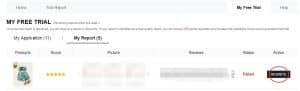
Editing option available to fix feedback that didn’t pass the first review
How to Get Approval Quickly:
Follow these straightforward guidelines to keep your account in good standing:
Extra Perk: Submitting a valid report earns 20 points. Featured reviews get 100 extra points.
Mistakes to Steer Clear Of
Avoid these habits so your profile stays eligible for upcoming rounds:
❌ Leaving your size measurements unselected in profile settings
❌ Setting a delivery address outside your registered app location
❌ Applying at the last minute right before the catalog refreshes
❌ Submitting very short comments with dark, blurry photos
❌ Letting the 10-day review period pass without uploading
❌ Neglecting to tap Rewrite after a review gets rejected
❌ Using the app only for giveaways without checking products or browsing
“I tried applying many times with no luck until I filled out my bust and height measurements in settings. Next time I applied right on refresh day and was picked for a cute top! The review process was super simple, too.”
— Jessica T., active app user ⭐⭐⭐⭐⭐
Important Trial Rules
• You can submit up to 3 item choices every 7 days (chances reset weekly).
• The shipping address must match the region listed on your account.
• Normal delivery for approved trial products is completely free of charge.
• Reviews must be posted within 10 calendar days of receiving your item.
• Rejected reviews receive 1 chance to be edited and resubmitted.
• Making duplicate accounts to game the system will lead to account restrictions.
• Skipping review posts will reduce your approval chances in future draws.
Frequently Asked Questions (FAQ)
Is there any shipping fee involved?
No. Standard shipping for approved items is 100% free.
How many products can I apply for each week?
You get 3 application attempts per weekly cycle.
What should I do if my report gets rejected?
Go to My Report, hit Rewrite, add clearer details and brighter images, then resubmit your review.
Do I need to return the clothing after reviewing?
No. Once your review is approved, the item remains yours to keep.
Popular choices run out fast. Check the app on update days, submit your requests early, and post great photos to keep winning free items!
Open the Free Trial Portal
Explore this week’s selection, pick your 3 favorite items, and follow your results directly in the app.
GO TO TRIAL CENTERThis link opens the official trial page inside the mobile app.
Help & support page: Trial Program Help Page
